![[PukiWiki]](image/logo.png "[PukiWiki]")
PowerShellでExcelファイルを操作する方法 †PowerShellでExcelファイル内の内容を読み込み表示するサンプルスクリプトを以下に記します。 使用したExcelブック †以下のように3つの列に値を入れたExcelファイルを作成しました。 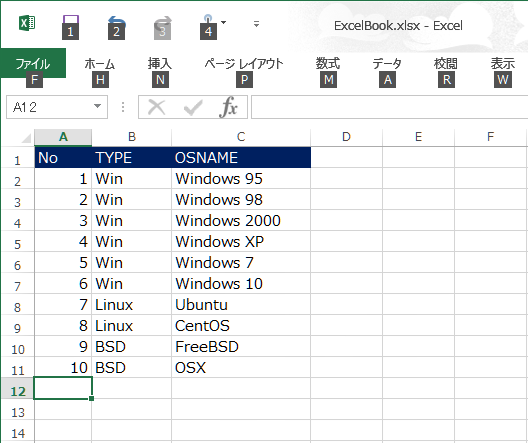 作成したExcelを読み込むPowerShellスクリプト †param($file)
# パラメタチェック
if ($file -eq $null) {
$thie = $MyInvocation.MyCommand.Name
"Usage: $this <Excel file>"
exit 1
}
# Excelファイルの有無チェック
if (!(Test-Path $file)) {
Write-Host $file not found.
exit 1
}
try {
$file = (Get-ChildItem $file).FullName
$excel = New-Object -ComObject Excel.Application
$excel.Visible = $false # <- Excel非表示
$book = $excel.Workbooks.Open($file)
$sheet = $excel.Worksheets.Item(1) # <- 1番目のシートを選択
$line = 1
while ($true) {
$item1 = $sheet.Cells.Item($line,1).Text
$item2 = $sheet.Cells.Item($line,2).Text
$item3 = $sheet.Cells.Item($line,3).Text
if ($item1 -eq "") { berak } # <- 空のセルを見つけたら終了
Write-Host "$item1, $item2, $item3" # <- 取得した情報を表示
$line++
}
} catch [Exception] {
$exp = $error[0].ToString()
} finally {
$excel.Quit()
}
スクリプト実行結果 †PS D:\> .\readexcel.ps1 .\ExcelBook.xlsx No, TYPE, OSNAME 1, Win, Windows 95 2, Win, Windows 98 3, Win, Windows 2000 4, Win, Windows XP 5, Win, Windows 7 6, Win, Windows 10 7, Linux, Ubuntu 8, Linux, CentOS 9, BSD, FreeBSD 10, BSD, OSX 以上、PowerShellでExcelシートの内容を読み込むサンプルスクリプトでした。 |


 01.png